

InstaUp APK: Free Tool to Increase Instagram Followers and Likes
A clear guide to the coin system, installation, account risks, and what to check before you download.
What’s on this page
- What Exactly Is InstaUp APK?
- How Does InstaUp Actually Work?
- Key Features
- InstaUp APK App Details
- How to Download?
- How to Install on Android
- How to Get Free Followers
- The InstaUp Coin System
- InstaUp Versus Growing the Normal Way
- Pros and Cons of InstaUp APK
- Is InstaUp APK Safe?
- Tips to Lower Your Risk Chances
- Safer Alternatives Worth Considering
- Frequently Asked Questions (FAQs)
- Conclusion
InstaUp APK is an external Android app that can increase Instagram followers, likes, and comments for your account absolutely free of charge. No monthly fees, no payment gateway, none of that. It operates via a coin economy, and you perform some actions within the app in order to earn some coins and use them to promote whichever Instagram profile you wish.
This article will cover all important details you should know before using this tool. How the app works, how its coin economy operates, how to install it on your device, and most importantly, where the pitfalls lie. All explained in clear terms, as this subject doesn’t require any unnecessary terminology.
Looking at other Instagram tools too? Our Insta Pro APK guide explains what modified Instagram apps claim to offer, how Insta Pro 2 differs, and the account risks to weigh. For watching public stories, read our Instagram Story Viewer guide before trusting any anonymous viewing service with your login or personal data. Both are separate tools from InstaUp, so it helps to check each one on its own terms.
What Exactly Is InstaUp APK?
It is not on the Google Play Store. It is downloaded as an APK file from a website and installed manually on your phone. When started, it will connect your Instagram profile and do all the work to increase the stats on your profile: the number of followers first, likes after, and sometimes even comments, depending on the particular version.
The basic principle that drives the process is nothing new and was widely known before – follow for follow, but done automatically and on a larger scale.
Think of a big pool of people who are there to follow the same goal as you. Every time you follow another person from the pool or like one of their posts, some coins appear in your account. Then, using those coins, you get followed or interacted with by other users from the pool. It is a kind of trade system, and coins keep it going equally.
There are two reasons for it being popular. First, it is really free of charge, no hidden fees, no freemium model. Second, the results come quickly. Not like those requiring you to wait for weeks or months to work, the APK works much faster.
How Does InstaUp Actually Work?
The workflow is simple; here is how it goes:
- Install the app. As it is not present on the Play Store, you have to install the application yourself using an APK file.
- Log in to the Instagram account. The app requires your account credentials to direct your followers and likes towards this account.
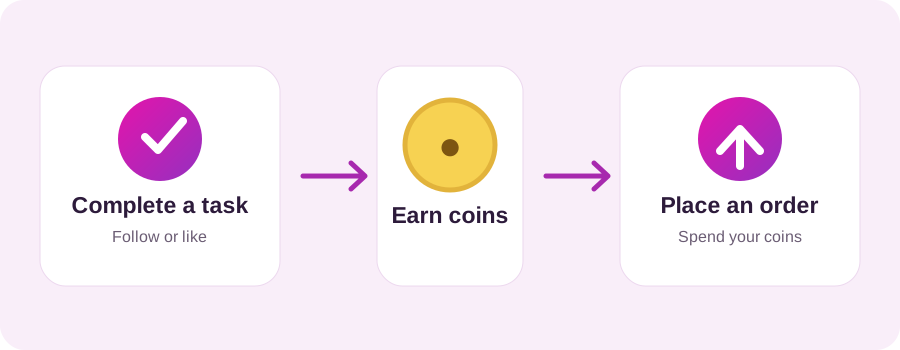
- Get Coins. You can do this by following other users on this platform, liking their posts, and watching short videos.
- Place an order. Use your coins to request followers or likes for your own profile, or for any profile you specify.
- Wait for delivery. Growth typically begins arriving within ten to fifteen minutes and continues over the following hours.
One approach many regular users swear by: register a second Instagram account specifically for doing coin tasks. Your main profile stays untouched while the spare account handles all the following and liking. It also keeps your primary feed from getting buried under random accounts you followed just for the coin reward.
If you are willing to put a couple of consistent hours into task completion, a meaningful follower gain within a single day is realistic.
Key Features
Plenty of tools make promises about Instagram growth. Most either disappoint or ask for your credit card details. InstaUp avoids both problems, and here is what actually sets it apart:
- No cost attached. Your time is the currency here. There are no fees hiding anywhere in the system.
- Real users in the network. Growth comes from actual app members, not software-generated bot accounts.
- Transparent coin system. Every task shows you exactly what it pays, and every order shows what it costs. Nothing is hidden on the platform.
- Fast turnaround. Orders usually begin processing within fifteen minutes of receipt.
- Keep your credentials secure. Your password for Instagram is entered right into the app; it does not go through a third party.
- Multiple profile support. You can manage growth across more than one Instagram account simultaneously.
- Low storage footprint. The app is lean and runs comfortably on older Android devices.
- Simple interface. New users rarely need longer than a few minutes to understand how everything works.
- Post-level engagement. Beyond followers, you can direct likes and comments to specific posts rather than just your profile overall.
InstaUp APK App Details
| Detail | Information |
|---|---|
| App Name | InstaUp |
| File Type | APK (Android Package) |
| Current Version | See download page |
| App Size | To verify |
| Operating System | To verify |
| Developer | Independent third-party developer |
| Price | Free (coin-based system) |
| Where to Get It | Official website or trusted APK sites (not on the Play Store) |
| Category | Social media growth tool |
| Permissions Needed | Instagram login, internet access |
How to Download?
Because the Play Store is not an option, you will handle the download yourself. Here is how to do it without running into trouble:
- Use a source you can actually verify. The official InstaUp website or a well-established APK platform is your best option. Links shared in forum threads and pop-up advertisements are where problems start.
- Confirm you are getting the current version. Older builds sometimes fail to connect properly or have known bugs. The latest release is worth the extra few seconds of verification.
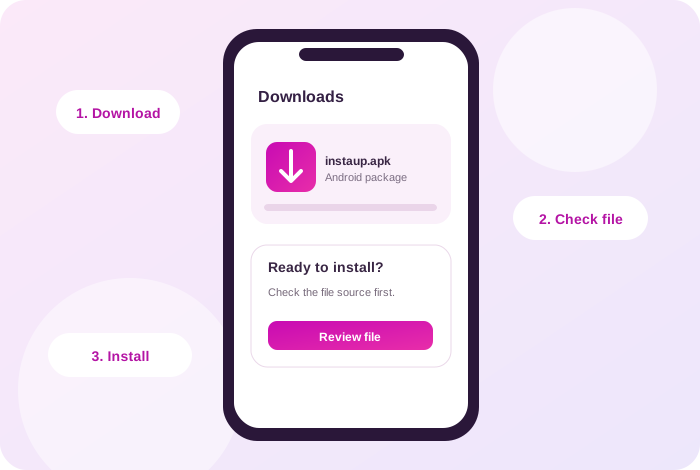
- Download the APK. It will land in your phone’s Downloads folder by default.
- Scan the file first if possible. Running a quick antivirus check before installing takes almost no time and provides a basic layer of protection.
- Enable installation from unknown sources. Head into Settings, then Security or Apps depending on your Android version, and allow your browser to install files it downloaded.
Important note: Any download page that demands you complete surveys, install additional apps, or create an account before releasing the file is not a legitimate source.
How to Install on Android
Once the file is on your device, installation itself is quick.
- Open your File Manager and find the InstaUp APK file in the Downloads folder.
- Tap it to start the installer.
- If your phone asks for security permissions, then tap Settings, authorise the installation and go back.
- Tap Install and wait for the installation to be completed.
- Now open the app and log in using your Instagram username and password.
You don’t need any verification steps; no technical configuration required. The installation will fail due to corruption during the download of the file. You need to delete the file and download it once again.
How to Get Free Followers
Having signed up, the application will split into two parts: earning the coins and using them. This is how they both work.
Earning Coins
- Open the Followers or Likes section from the navigation menu.
- Tap Follow next to a profile. The app redirects you to Instagram to complete the follow.
- Return to InstaUp. Your coin total updates automatically.
- This process is the same for getting likes. You engage with the post, come back, and get your reward.
- Some versions of the app offer extra coins as a reward for daily check-ins and viewing videos.
Placing an Order
- Go to the Order part of the application and choose your boost type – either followers, likes, or comments.
- Write your Instagram username or the direct link to the post.
- Select a quantity. Each increment corresponds to a fixed coin cost.
- Confirm the order and give it time. Most begin delivering within fifteen minutes.
One practical note: resist the urge to order large quantities all at once. A profile that leaps from three hundred followers to five thousand overnight draws attention from Instagram’s detection systems and from anyone who visits your profile. Gradual, steady increments hold up far better over time.
The InstaUp Coin System
Coins are the mechanism that makes the whole exchange function. Treat them as the app’s internal currency.
| Action | Outcome |
|---|---|
| Follow another user | Coins earned (larger amount) |
| Like another user’s post | Coins earned (smaller amount) |
| Watch a video ad | Bonus coins added |
| Daily login | Small free coin reward |
| Order 100 followers | Fixed coin cost deducted |
| Order 100 likes | Fixed coin cost deducted |
The exact numbers may vary from one version to another, but the concept remains the same: the more tasks, the more coins, and the more coins, the more you grow. It is possible for users to keep generating a constant stream of new followers without paying anything real.
InstaUp Versus Growing the Normal Way
| Factor | InstaUp APK | Organic Growth |
|---|---|---|
| Speed | Very fast (hours to days) | Very slow (months to years) |
| Cost | Free, but requires your time | Free, but requires content effort |
| Follower quality | Mixed: real accounts, often inactive | High: genuine interest in your content |
| Engagement rate | Usually low | Usually strong |
| Account safety | Risky: against Instagram’s rules | Fully safe |
| Skill required | None | Content creation, consistency, timing |
| Long-term value | Weak | Strong and lasting |
The APK wins if you are measuring in days. Organic growth wins if you are measuring in years. Every user has to decide which of those actually matters more for what they are trying to build.
Pros and Cons of InstaUp APK
What it has going for it:
- Followers and likes at no monetary cost
- Visible results within a short timeframe
- Accessible enough that no learning curve is required
- Powered by real user accounts rather than bot-generated activity
- Light enough to run on budget-tier Android hardware
What works against it:
- Directly violates Instagram’s terms of service
- Carries genuine risk of account warnings, action blocks, or permanent bans
- Followers frequently drop off over time
- Newly acquired followers rarely engage with content in any meaningful way
- Side-loading APKs always carries more inherent risk than using verified app stores
Is InstaUp APK Safe?
The app functions as described, but “safe” is not a label that applies to it cleanly.
Instagram’s terms of service are unambiguous on this point. External tools designed to manufacture engagement are prohibited. When you use this APK, the login activity coming from your account looks unusual to Instagram’s automated systems. Depending on how that activity is interpreted, responses range from a mild warning all the way through to permanent removal of the account.
There is also a privacy dimension that should not be glossed over. Any third-party application that takes your Instagram login is a potential weak point. If that app’s infrastructure were ever compromised, your credentials could end up exposed. This is the reason many users insist on running all coin tasks through a throwaway account, keeping their primary login entirely separate from the process.
To be fair about it: a large number of people use the platform without ever running into trouble. But other people’s experience is not a guarantee of yours. The risk exists; it falls on the person using the app, and any honest account has to say so directly.
Tips to Lower Your Risk Chances
If, however, you still want to give it a try, here are some safety measures that would be wise to consider:
- Always complete your coin assignments using your secondary account, not your primary one.
- Use smaller orders; many smaller orders throughout the day will draw less suspicion than one big order.
- Never work non-stop with the app. Intervals between sessions appear much more realistic.
- Never use the same password in other applications.
- Periodically change your Instagram password, especially after any third-party app sessions.
- Download exclusively from the official InstaUp source. Unofficial copies of popular apps frequently carry bundled malware.
- Make use of two-factor authentication in your Instagram account. This is a free service that does not require much and provides significant protection from unauthorised use.
- If Instagram gives you any warnings regarding your account, stop right there for a few days and let your account work normally again.
Safer Alternatives Worth Considering
If the risk picture feels too heavy, there are legitimate routes available:
- Content-led organic growth. Reels, well-timed posts, relevant audio trends, and captions that actually say something of value still outperform shortcuts over any meaningful timeframe.
- Instagram’s paid advertising tools. Not free, but entirely above board, and the targeting capabilities put your content in front of audiences that are actually relevant.
- Niche collaborations and shoutouts. Partnering with accounts in your space tends to attract followers with a genuine interest in what you post, people who stay.
- Other coin-based platforms. InsFollow, GetInsta, and similar services operate on comparable mechanics. The trade-offs are roughly equivalent.
Frequently Asked Questions (FAQs)
Is InstaUp APK completely free?
Yes. Coins are earned through tasks and spent on growth. No money changes hands. Some versions do offer optional paid upgrades that accelerate coin earning, but the standard free model is fully functional on its own.
Why is it not on the Google Play Store?
Because it conflicts with Instagram’s policies. Google excludes apps of this type from the Play Store, which means downloading the APK file manually from the official website or a trusted platform is the only route.
Do I have to give the app my Instagram password?
You do; the app requires your credentials to direct followers and likes to your profile. That is exactly why privacy-conscious users stick to a secondary account for this purpose and keep two-factor authentication active on anything that matters.
Can my account get banned?
Yes, it genuinely can. Instagram treats artificial engagement growth as a violation and pursues it actively. Many users get through without incident, but warnings, action blocks, and permanent bans have all been reported by real users. There is no reliable way to guarantee your account will not be affected.
Are the followers real people?
Largely, yes. They are other users of the app who followed you in exchange for coins- real accounts, but not people with any actual interest in your content. Follower counts rise; genuine engagement typically does not follow.
Will those followers stick around?
A portion will not. Many followed purely to collect coins and will quietly remove the follow afterwards. After a few weeks, some drop in your total count is normal.
Does InstaUp work on iPhone?
No. This is an Android-only application. iPhones cannot run APK files, and no version of the platform has been released for iOS.
How many followers can I realistically get per day?
There is no hard ceiling; it depends entirely on how many coins you can earn and how you choose to spend them. Regular users report several hundred per day being achievable. Keeping that number modest is advisable if avoiding detection matters to you.
Is the APK file itself safe to download?
The legitimate file has a broadly clean reputation among users. The problem is unofficial copies hosted on unverified sites, which sometimes contain malware. Stick to the official source and scan the file before running it.
Should I use InstaUp on my business account?
That would not be the recommended approach. A business account carries real reputational weight, and the downside of a ban or a credibility hit outweighs what a few hundred followers contribute. Paid promotion and organic strategy are the more defensible path for anything with a brand attached to it.
Conclusion
InstaUp APK occupies a space that a surprisingly large number of Instagram users pass through at some point. The app does what it claims: followers and likes show up faster than any organic method would deliver them, the coin system is transparent, and there is genuinely no monetary cost involved. For someone who wants a profile that looks established before committing to a longer content strategy, that combination is genuinely appealing.
But shortcuts carry deferred costs. This one breaks Instagram’s rules, exposes your account to enforcement action, and fills your follower list with people who will scroll past your posts indefinitely.
Explore the rest of the site
Choose the page that answers your next question. Every button stays within this website.
If you are comparing a free Instagram story viewer online with an anonymous Instagram story viewer, check its privacy claims before using it. A private account’s story still belongs to the audience its owner chose.
InstaUp APK
See the APK status, file details, install steps and common questions before choosing a download.
InstaUp APK
Insta Pro and Insta Pro 2
Compare the modified app versions, feature claims and checks that matter before installing an APK.

Instagram Story Viewer
Understand public stories, anonymous viewing claims and the privacy trade-offs of third-party viewers.
Instagram Story ViewerBlog and practical answers
Read focused articles on APK safety, Android installation, the coin system and Instagram privacy.
Browse all articles